
Renaissance app

APP REDESIGN

NEW ZEALAND GOVERNMENT

GOVERNMENT

SUSTAINABILITY

Getting fishermen the right rules, at the right time, even offline

APP DESIGN

MUSIC STARTUP

COMMUNITY

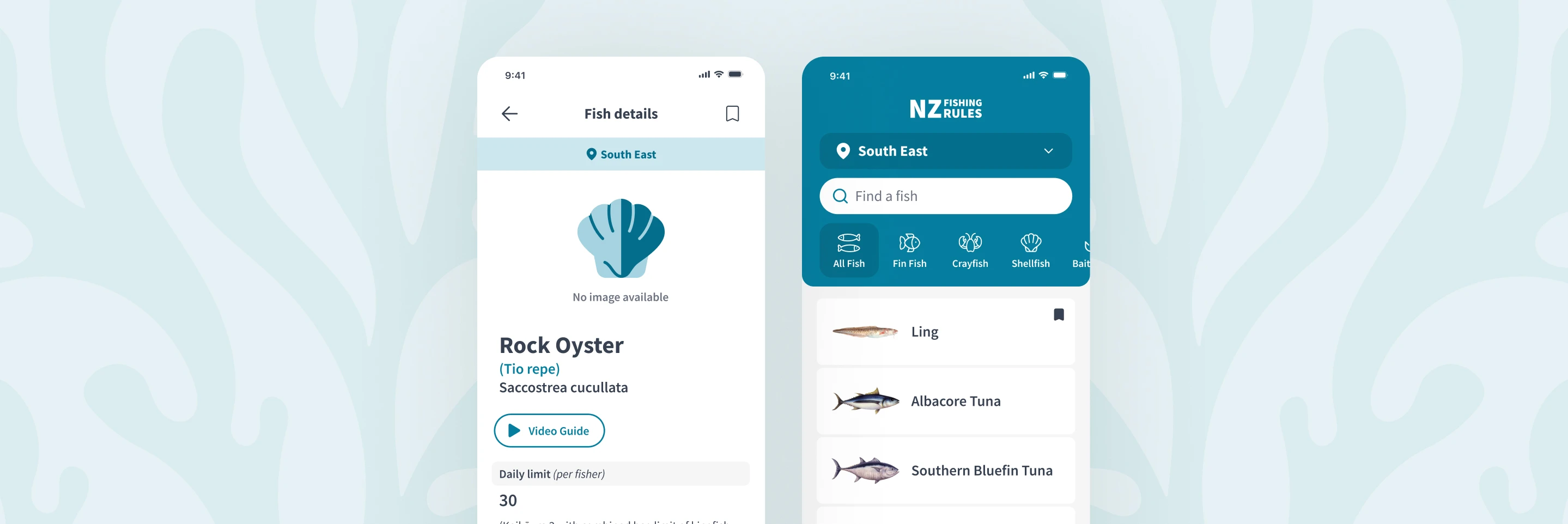
New Zealand's recreational fishermen need to know the rules before they cast a line, and the MPI app helps them do just that.

At their fingertips, they can identify fish and learn regional fishing rules from anywhere, even out at sea. This helps preserve aquatic environments, allows fish populations to thrive, and keeps fishermen safe from legal consequences.

I joined the project two months before launch to cover PK's lead designer and worked closely with the team to get the app over the finish line.

Project Overview

My Role

My Role.

My Role

Lead product designer

Lead product designer

Team

Team

Team

1 PM, 5 developers & myself

Timeline

Timeline

Timeline

2 months from me joining to app launch

Key outcomes

20+

QA issues caught before launch

Speed was key

App launched on time with quick turnaround

Background

The project was already in motion when I stepped in. Paperkites' lead designer had done an amazing job at getting the main flow to a good place - thanks, Cole!

Day one, I sat down with the PM to map out what's needed before launch.

Some of the tasks left:

  • Onboarding flow

  • Error states and offline handling

  • The "More" menu and IA

  • Custom icons and illustrations

  • Accessibility and QA

Developers were already building fast, so I had to move just as quickly to stay ahead of them.

The project was already in motion when I stepped in. Paperkites' lead designer had done an amazing job at getting the main flow to a good place - thanks, Cole!

Day one, I sat down with the PM to map out what's needed before launch.

Some of the tasks left:

  • Onboarding flow

  • Error states and offline handling

  • The "More" menu and IA

  • Custom icons and illustrations

  • Accessibility and QA

Developers were already building fast, so I had to move just as quickly to stay ahead of them.

The project was already in motion when I stepped in. Paperkites' lead designer had done an amazing job at getting the main flow to a good place - thanks, Cole!

Day one, I sat down with the PM to map out what's needed before launch.

Some of the tasks left:

  • Onboarding flow

  • Error states and offline handling

  • The "More" menu and IA

  • Custom icons and illustrations

  • Accessibility and QA

Developers were already building fast, so I had to move just as quickly to stay ahead of them.

The project was already in motion when I stepped in. Paperkites' lead designer had done an amazing job at getting the main flow to a good place - thanks, Cole!

Day one, I sat down with the PM to map out what's needed before launch.

Some of the tasks left:

  • Onboarding flow

  • Error states and offline handling

  • The "More" menu and IA

  • Custom icons and illustrations

  • Accessibility and QA

Developers were already building fast, so I had to move just as quickly to stay ahead of them.

1. Onboarding

The problem

The problem

The problem

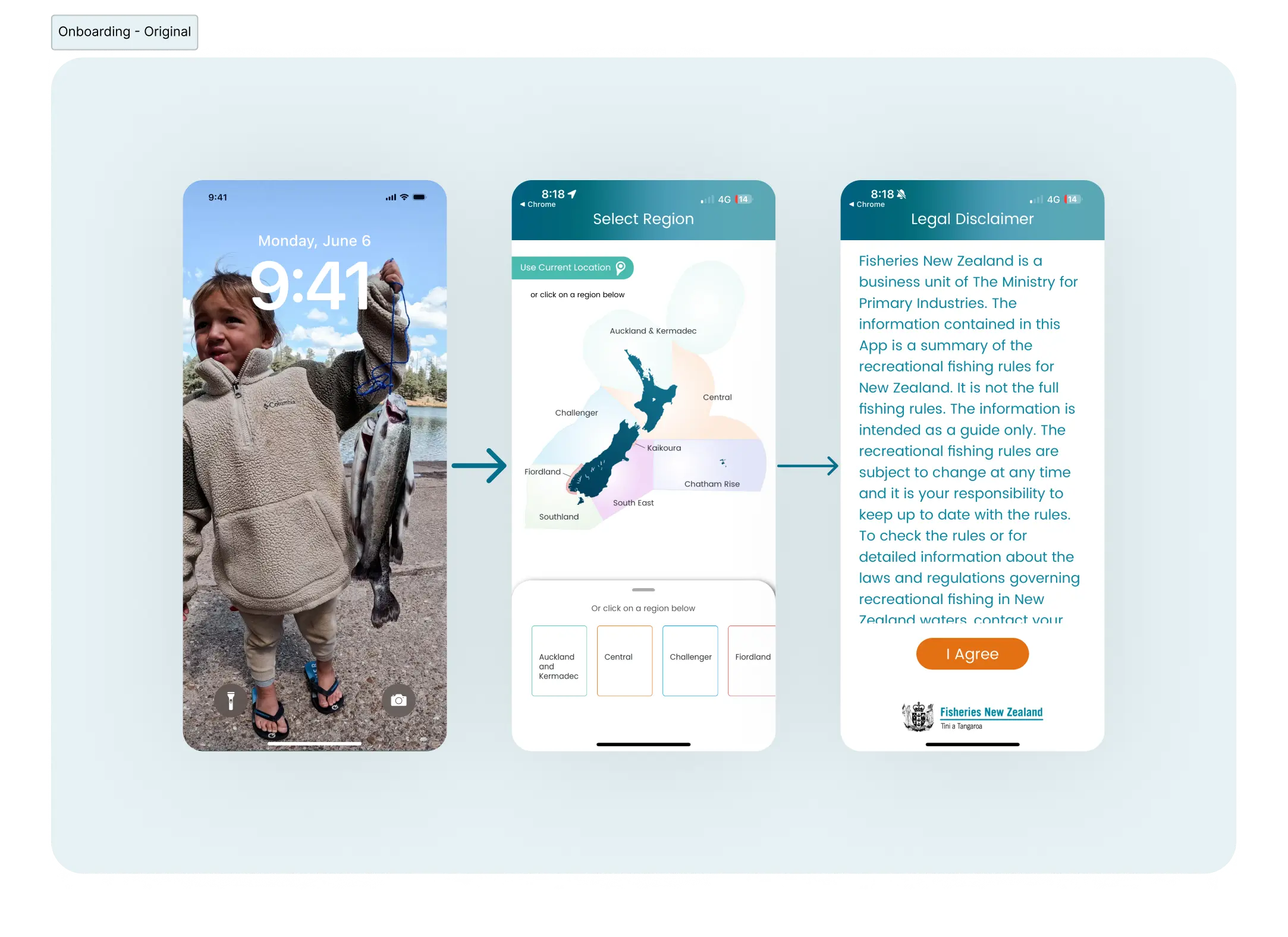
The original flow had a critical gap. If a user accidentally selected the wrong region, there was no way to correct it without closing the app and starting over, or changing it after onboarding.

For a first-time user, that's a frustrating way to begin, and it was easily avoidable.
Different Renaissance screens

The solution

The solution

The solution

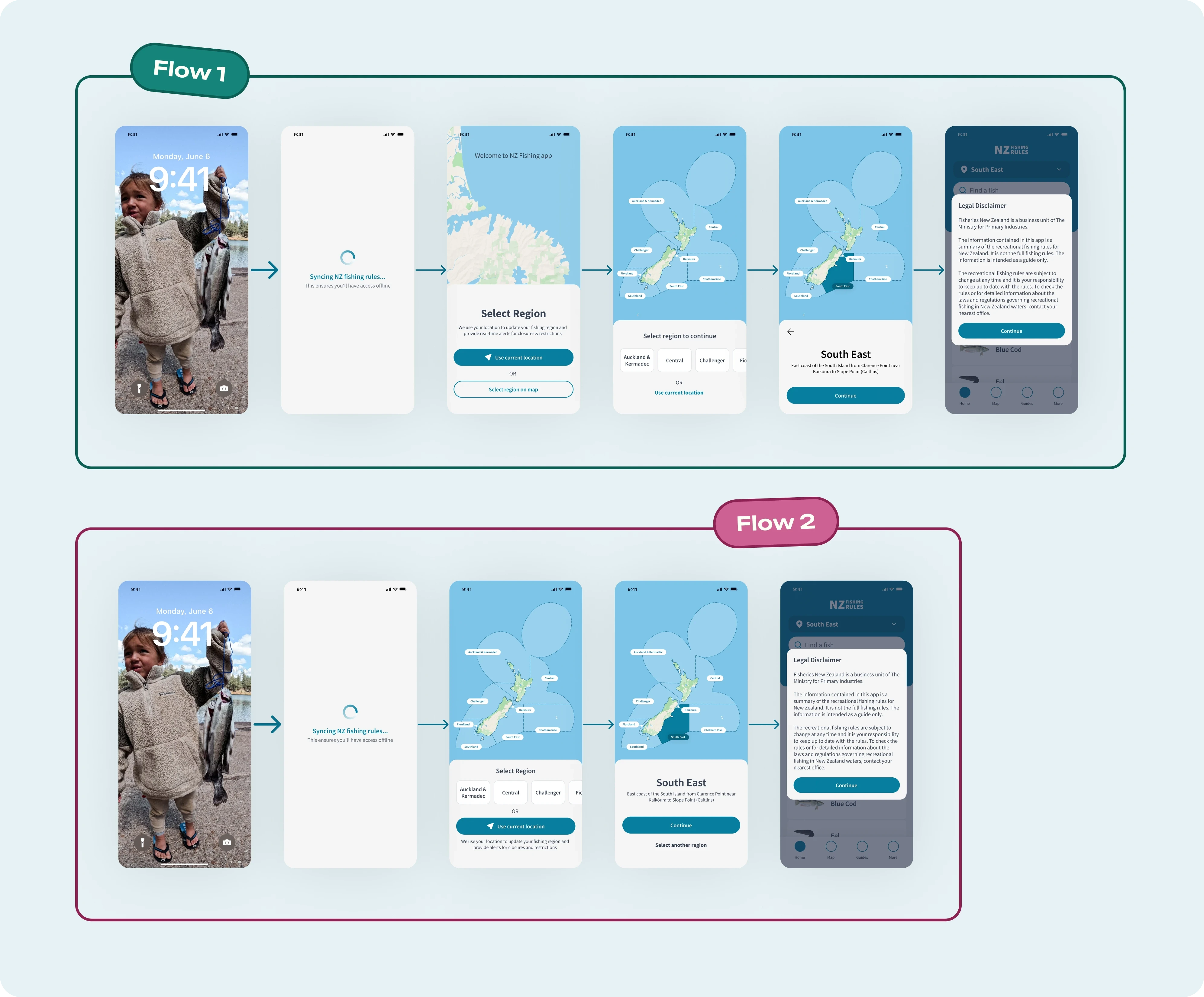
I talked through two options with the devs. The first introduced the map with a bit more context upfront, letting users skip it entirely by choosing their current location. Good, but not lean enough given the timeline. The solution we went with was a switchable overlay, which kept it to one screen without losing any functionality.
Different Renaissance screens

2. Alerts and error states

Fishermen's time is often spent out at sea. Because of this, app data needs syncing on first launch.

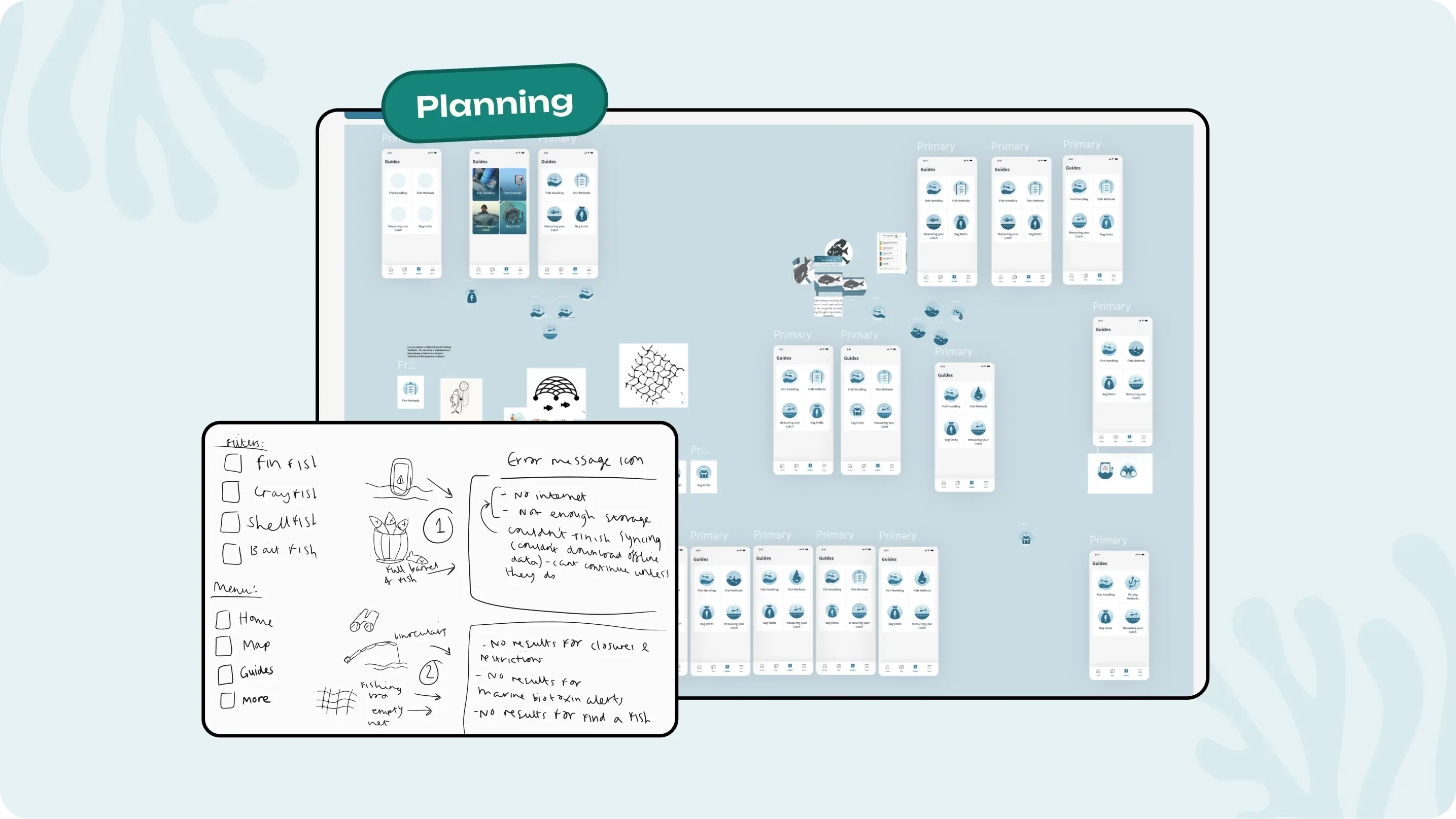
Working closely with the dev team, we established exactly which errors could occur during setup.

There were two:

1. The connection dropping mid-sync
2. Not enough storage on the device.

Working closely with the dev team, we established exactly which errors could occur during setup.

There were two:

1. The connection dropping mid-sync
2. Not enough storage on the device.

Working closely with the dev team, we established exactly which errors could occur during setup.

There were two:

1. The connection dropping mid-sync
2. Not enough storage on the device.

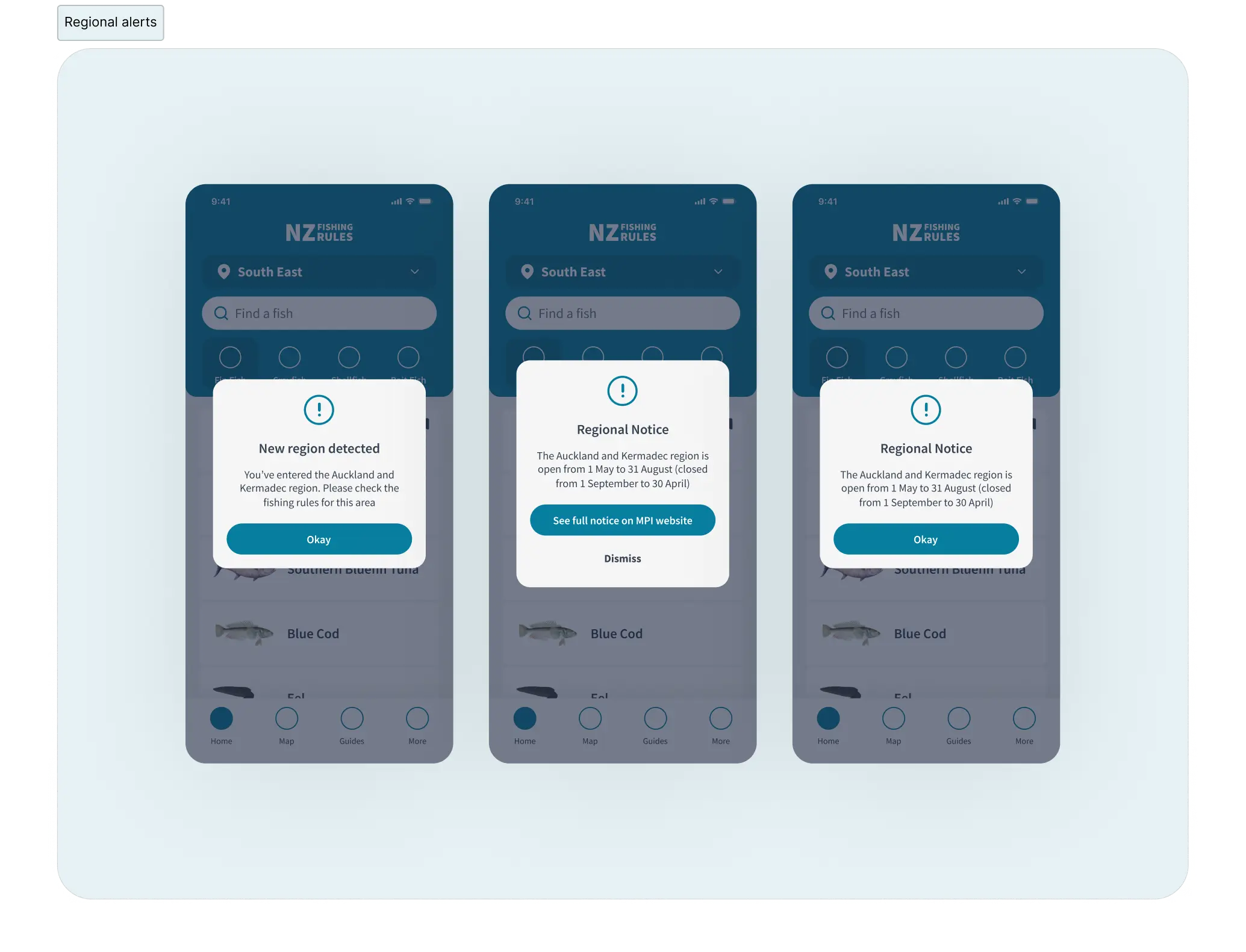
I also designed the regional alerts. One alert if GPS detects a location outside their selected region, and an alert for closures and restrictions. I designed reusable screens, so devs could implement them quickly.
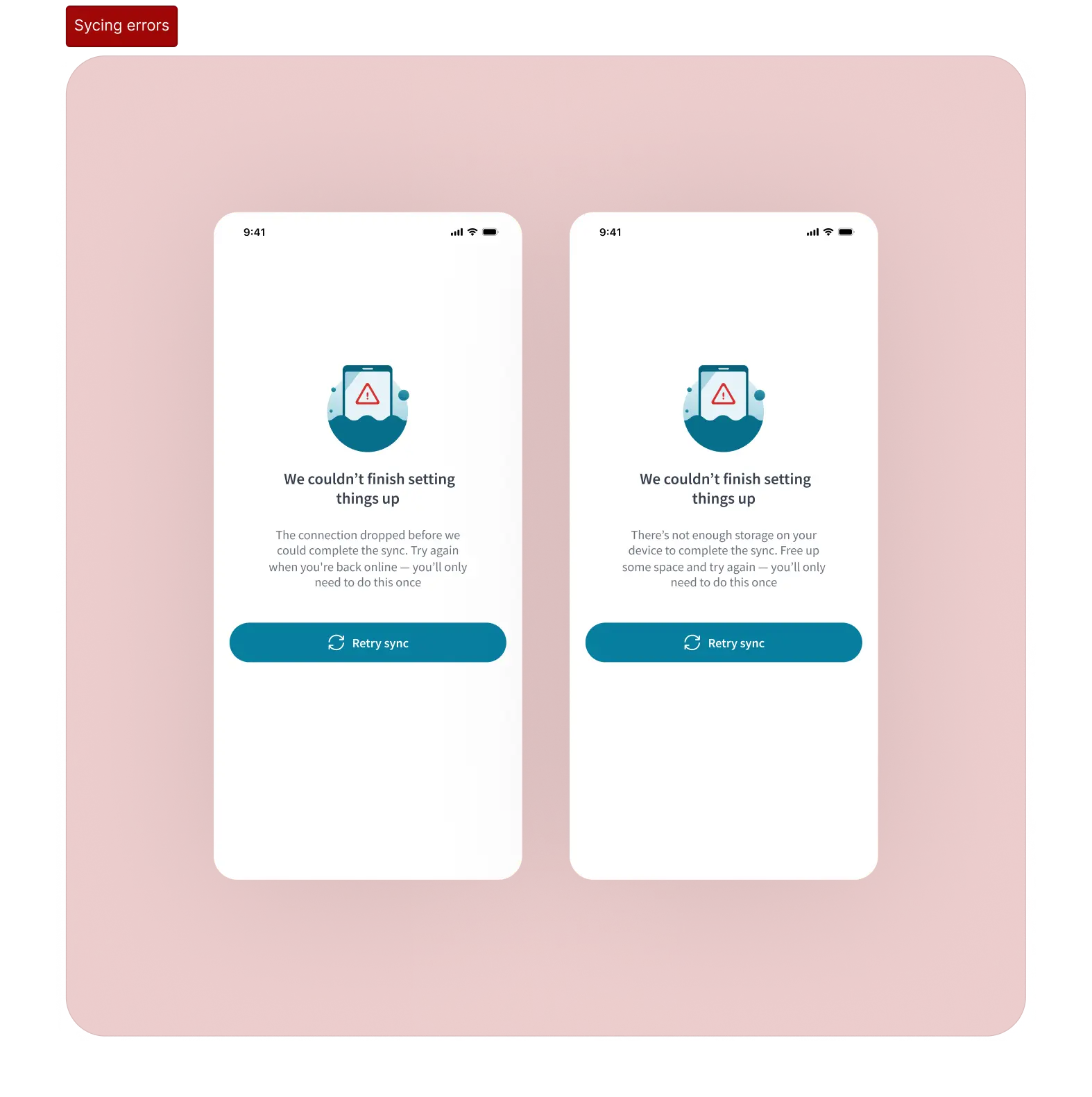
Different Renaissance screens

3. Icons and illustrations

The NZ Government Fisheries guidelines defined colour, type, and imagery at a broad level. Icons and illustrations hadn't been defined, so I used existing MPI assets as a reference point and pushed them to feel more fun and modern.
Mood board featuring other music apps, colour and typeface inspiration

Filter and bottom bar icons

Filter and bottom bar icons

Filter and bottom bar icons

At 32x32px, every line counts. Making them cohesive and simple was the priority, and all icons had to be immediately recognisable at that size. The crayfish filter was by far the hardest! I made it work by slowly eliminating lines until it perfectly balanced the other icons.

Illustrations

Illustrations

Illustrations

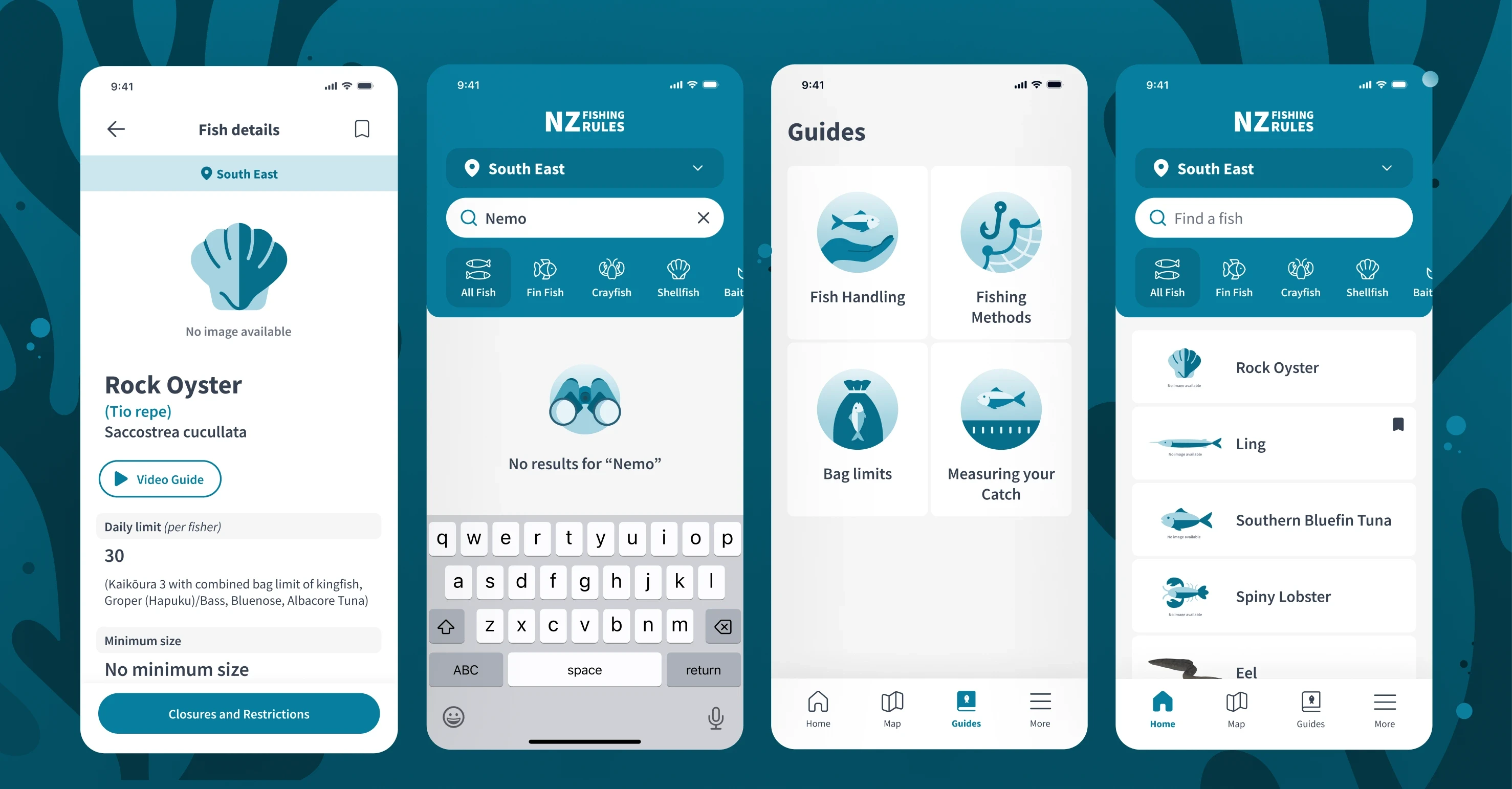
Illustrations are used throughout the app, so they all had to feel cohesive. I created them for the fishing guide section, no search results, error states and "no fish" placeholder images.
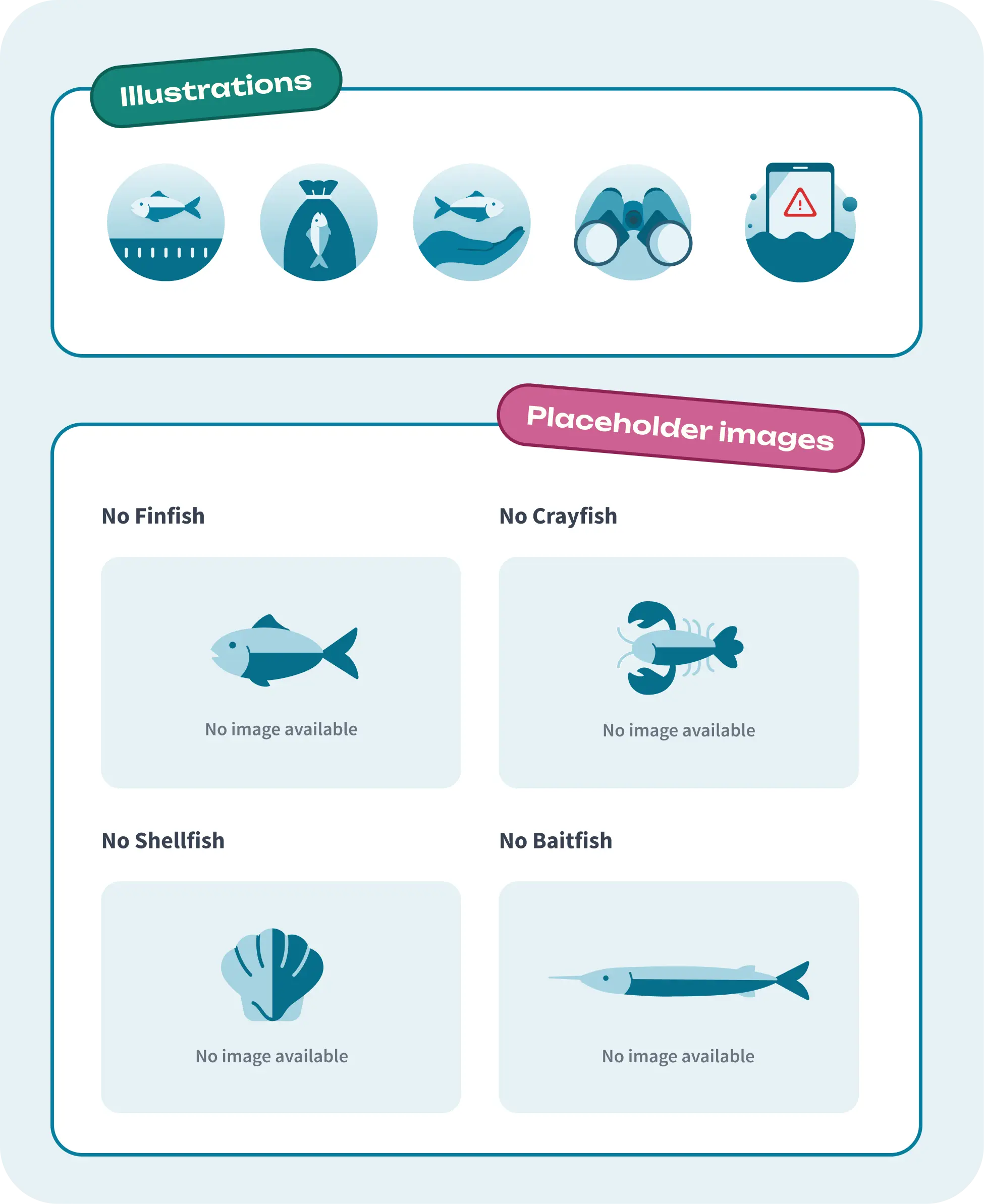
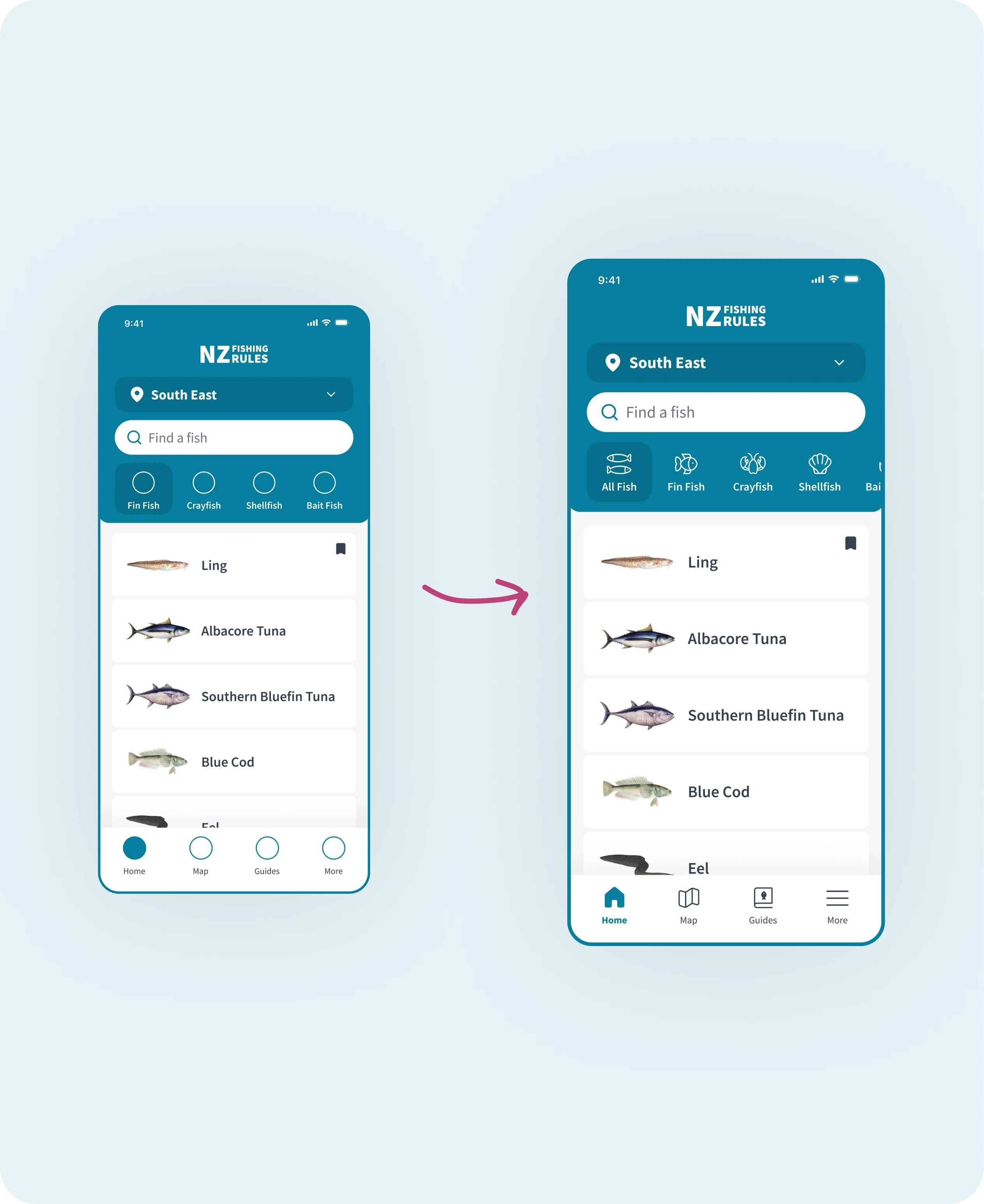
Mood board featuring other music apps, colour and typeface inspiration
Different Renaissance screens

4. WYSIWYG editor (Style guide)

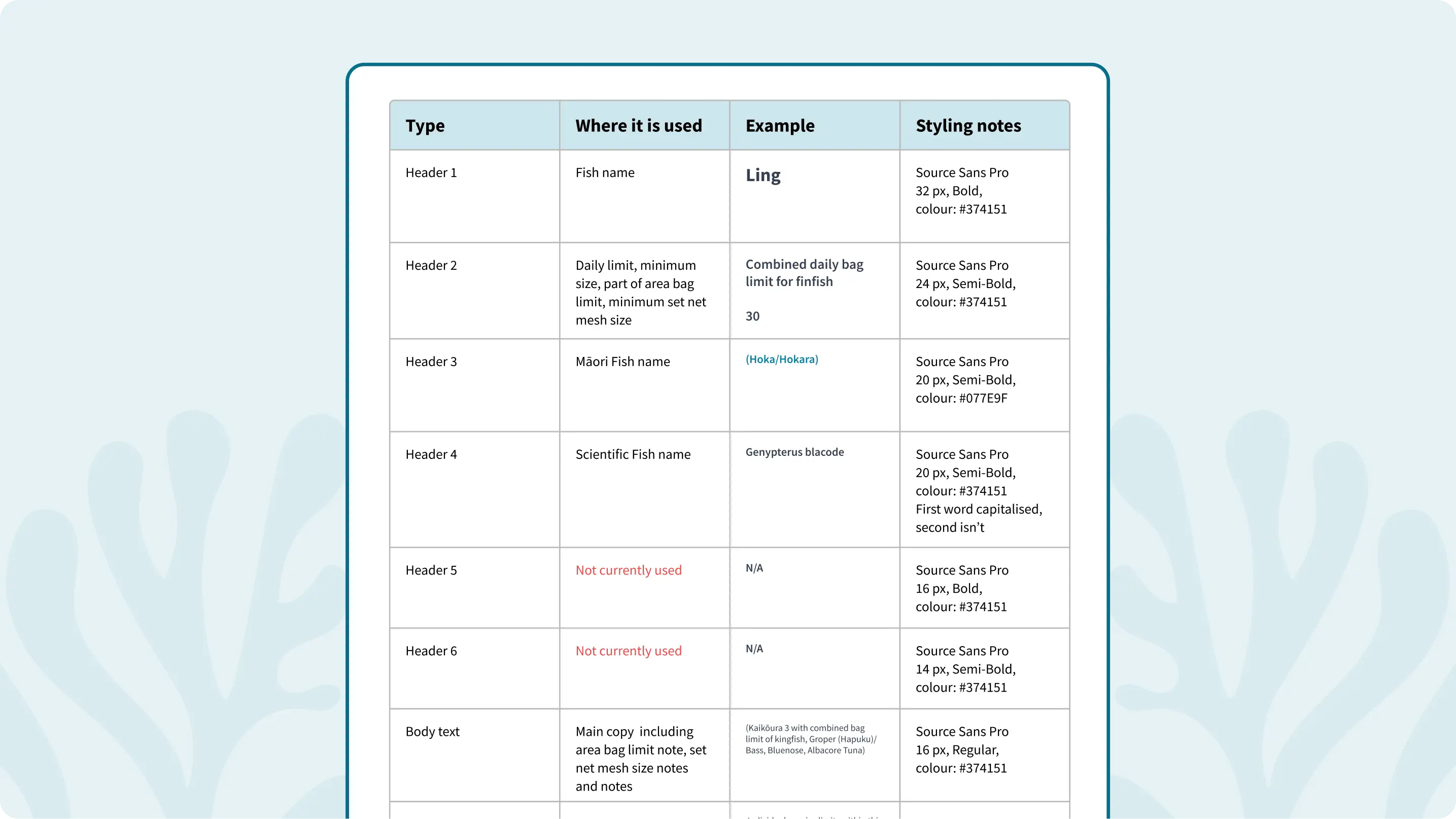
All the screens within the menu and guides needed to have the same CMS styling to keep the screens consistent. I created a WYSIWYG editor (Style guide) for the team to follow.
Mood board featuring other music apps, colour and typeface inspiration

WYSIWYG editor (Style guide)

5. Accessibility and QA
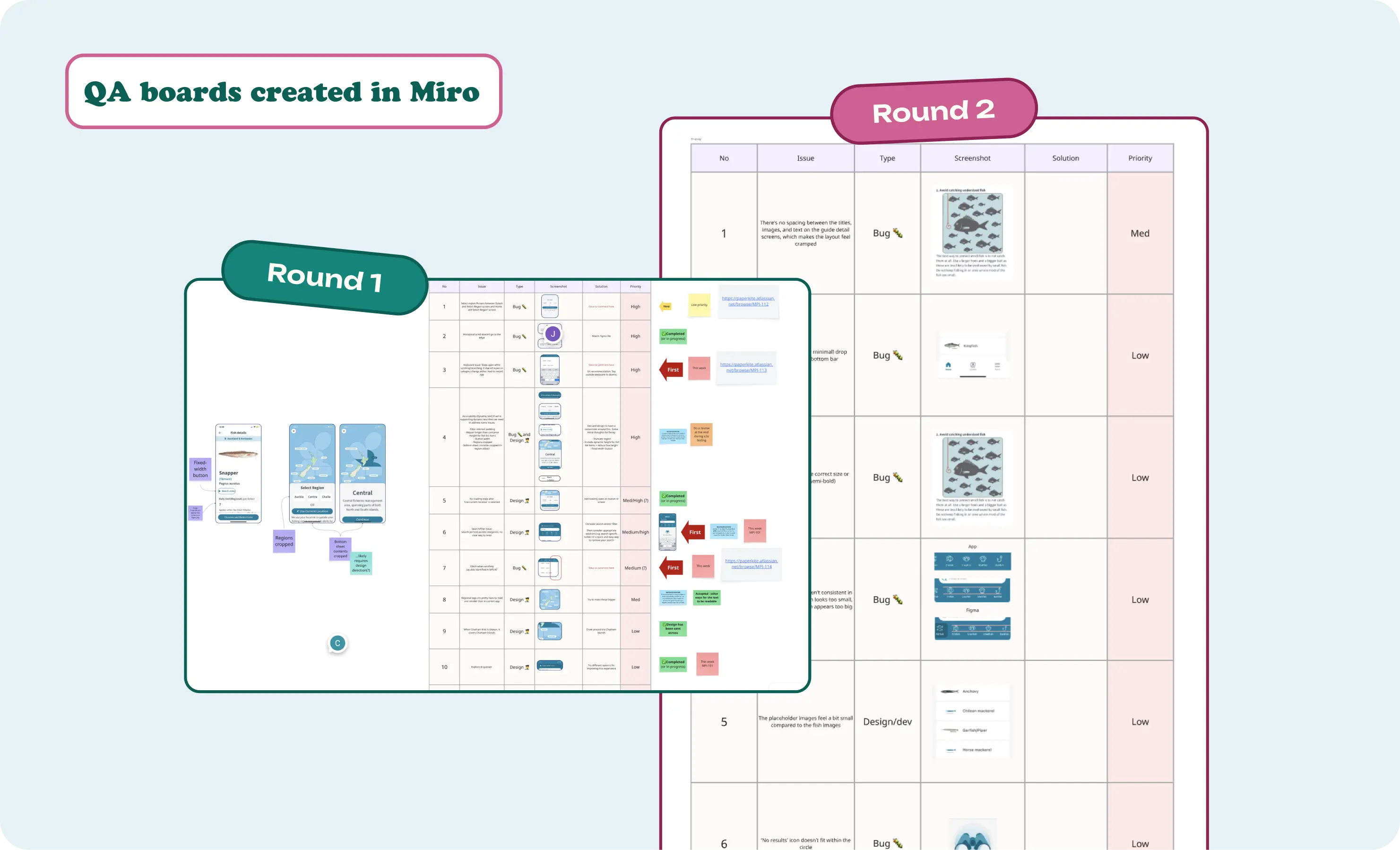
I stayed throughout the build, running ongoing design QA with the dev team. I caught over 20 issues before launch, covering: Accessibility, usability and dev bugs/design mismatches. I then prioritised them from high to low importance. Ensuring the app passed WCAG requirements was a top priority.

Issues I found:

  • Text cropping issues across devices

  • No clear way to reset the search

  • Several bugs that would have affected usability at launch

I stayed throughout the build, running ongoing design QA with the dev team. I caught over 20 issues before launch, covering: Accessibility, usability and dev bugs/design mismatches. I then prioritised them from high to low importance. Ensuring the app passed WCAG requirements was a top priority.

Issues I found:

  • Text cropping issues across devices

  • No clear way to reset the search

  • Several bugs that would have affected usability at launch

I stayed throughout the build, running ongoing design QA with the dev team. I caught over 20 issues before launch, covering: Accessibility, usability and dev bugs/design mismatches. I then prioritised them from high to low importance. Ensuring the app passed WCAG requirements was a top priority.

Issues I found:

  • Text cropping issues across devices

  • No clear way to reset the search

  • Several bugs that would have affected usability at launch

Mood board featuring other music apps, colour and typeface inspiration

Outcome

What a joy to work on such an impactful project with an amazing team! Big shout out to Cole, PaperKite's designer, for making my life easy with a great foundation, Steph for getting me up to speed so quickly, and the devs for bringing it all to life.

Jade was an amazing super sub

I wouldn't hesitate to recommend Jade for any engagement where you need a product designer that can hit the ground running, deliver high-quality work under tight timelines, and seamlessly integrate with existing teams.

Stephanie Kan
Client Delivery Manager @ PaperKite

Jade was an amazing super sub

I wouldn't hesitate to recommend Jade for any engagement where you need a product designer that can hit the ground running, deliver high-quality work under tight timelines, and seamlessly integrate with existing teams.

Stephanie Kan
Client Delivery Manager @ PaperKite

Jade was an amazing super sub

I wouldn't hesitate to recommend Jade for any engagement where you need a product designer that can hit the ground running, deliver high-quality work under tight timelines, and seamlessly integrate with existing teams.

Stephanie Kan
Client Delivery Manager @ PaperKite

Mood board featuring other music apps, colour and typeface inspiration

